Most raw NASA Earth observation data (Level 0, see data processing levels) are processed at NASA's Science Investigator-led Processing Systems (SIPS) facilities. All data are processed to at least a Level 1, but most have associated Level 2 (derived geophysical variables) and Level 3 (variables mapped on uniform space-time grid scales) products. Many even have Level 4 products. NASA Earth science data are available fully, openly, and without restriction to data users.
Most data are stored in Hierarchical Data Format (HDF) or Network Common Data Form (NetCDF) format. Numerous data tools are available to subset, transform, visualize, and export to various other file formats.
Once data are processed, they can be used in a variety of applications, from agriculture to water resources to health and air quality. A single instrument will not address all research questions within a given application. Users often need to leverage multiple instruments and data products to address their questions, bearing in mind the limitations of data provided by different spectral, spatial, and temporal resolutions.
Creating Satellite Imagery
Many instruments acquire data at different spectral wavelengths. For example, Band 1 of the OLI aboard Landsat 8 acquires data at 0.433-0.453 micrometers while the MODIS Band 1 acquires data at 0.620-0.670 micrometers. OLI has a total of 9 bands whereas MODIS has 36 bands, all measuring different regions of the electromagnetic spectrum. Bands can be combined to produce imagery of the data to reveal different features in the landscape. Often imagery of data are used to distinguish characteristics of a region being studied or to determine an area of study.
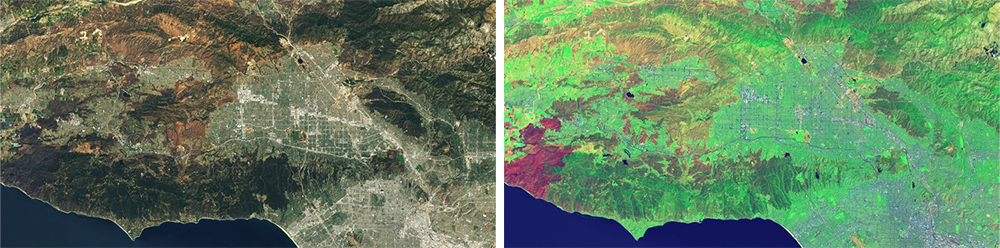
True-color images show Earth as it appears to the human eye. For a Landsat 8 OLI true-color (red, green, blue [RGB]) image, the sensor Bands 4 (Red), 3 (Green), and 2 (Blue) are combined. Other spectral band combinations can be used for specific science applications, such as flood monitoring, urbanization delineation, and vegetation mapping. For example, creating a false-color image from data acquired by the Visible Infrared Imaging Radiometer Suite (VIIRS) aboard the Suomi National Polar-orbiting Partnership (Suomi NPP) platform, using bands M11, I2, and I1 is useful for distinguishing burn scars from low vegetation or bare soil as well as for exposing flooded areas. To see more band combinations from Landsat sensors, check out NASA Scientific Visualization Studio's video Landsat Band Remix or the NASA Earth Observatory article Many Hues of London. For other common band combinations, see NASA Earth Observatory's How to Interpret Common False-Color Images, which provides common band combinations along with insight into interpreting imagery.